Aveon Inventory Management
Manage purchasing, stock levels, item movements, suppliers and inventory records with a centralized inventory management system built for educational institutions.
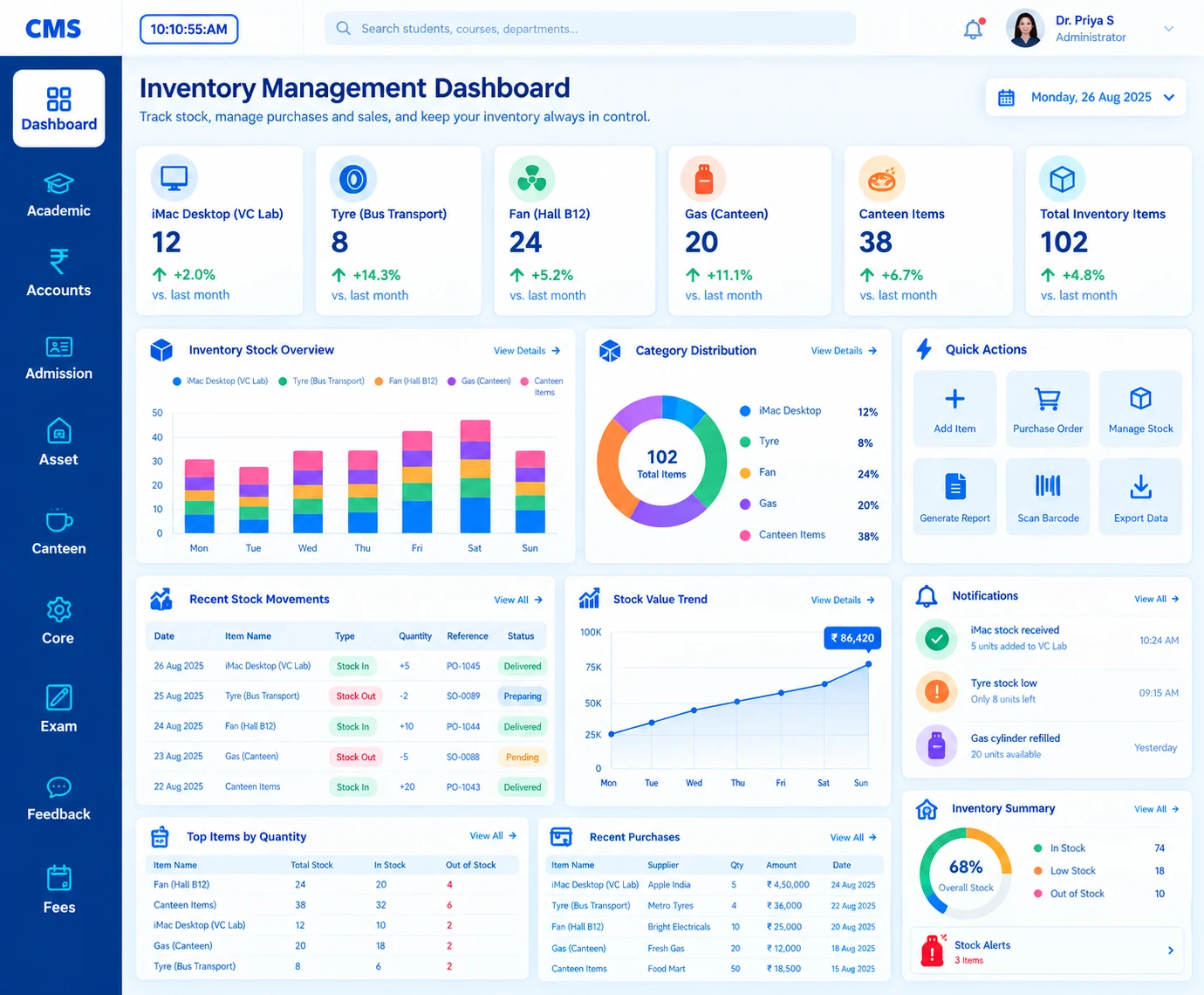
Know What You Have. Where It Is. What You Need.
Managing inventory across a school, college or university is much more than a stock register. Institutions handle stationery, lab resources, office supplies, consumables and equipment across departments, stores and locations.
Aveon Inventory Management brings items, suppliers, purchases, receipts, issues, transfers and returns into one centralized digital workflow, part of the wider Aveon ERP ecosystem.
Manage stock. Track movement. Improve visibility.
Complete Inventory Management Modules
Everything you need to organise institutional inventory, grouped into four connected domains, from setup to reports.
Inventory Setup
- Item Management
- Item Categories
- Units
- Store Management
- Location Management
- Supplier Management
Stock Operations
- Opening Stock
- Stock Receipt
- Stock Issue
- Stock Transfer
- Stock Return
- Stock Adjustment
- Stock Verification
Purchase Management
- Purchase Requests
- Purchase Records
- Supplier Records
- Purchase Receipts
- Purchase Tracking
Inventory Visibility
- Current Stock
- Stock Movement
- Item-Wise Reports
- Store-Wise Reports
- Department-Wise
- Inventory Reports
Explore the Modules in Detail
Open any module to see what's inside. Each one works on its own and shares everything with the rest.
Item Management
One item, one record: better inventory visibility from the start.
Item Management
One item, one record: better inventory visibility from the start.
- Item information
- Item category & type
- Unit of measurement
- Item description
- Stock information
- Store information
Category Management
Organise stock into meaningful categories so information is easy to locate.
Category Management
Organise stock into meaningful categories so information is easy to locate.
Example categories
- Stationery
- Laboratory Materials
- Office Supplies
- Electrical Items
- Maintenance Materials
- Academic Resources
- Consumables
- General Supplies
Store & Location Management
Know what you have and where it belongs, across stores and locations.
Store & Location Management
Know what you have and where it belongs, across stores and locations.
- Institution
- Store
- Location
- Item
- Stock by location
Supplier Management
Keep procurement information organised and connected to inventory.
Supplier Management
Keep procurement information organised and connected to inventory.
- Supplier information & records
- Purchased items
- Purchase-related information
- Supplier transactions
Purchase Management
Bring procurement and inventory together: purchase, receive, record, manage.
Purchase Management
Bring procurement and inventory together: purchase, receive, record, manage.
- Purchase requests
- Purchase information
- Supplier & items
- Quantities
- Purchase records
- Received materials
Stock Receipt
Every receipt becomes part of your inventory record.
Stock Receipt
Every receipt becomes part of your inventory record.
- Received items & quantities
- Supplier information
- Receipt details
- Store / location
- Stock updates
Stock Issue
Every issue, every quantity, every destination recorded.
Stock Issue
Every issue, every quantity, every destination recorded.
- Item issues & quantities
- Receiving department
- Store information
- Issue records
- Stock balance
Stock Transfer
Move inventory between stores, departments or locations: accurately.
Stock Transfer
Move inventory between stores, departments or locations: accurately.
- Transfer requests
- Source & destination location
- Items & quantities
- Transfer records
Stock Return
Keep returned inventory accounted for and stock current.
Stock Return
Keep returned inventory accounted for and stock current.
- Returned items & quantities
- Return records
- Store updates
- Stock balances
Stock Adjustment & Verification
Keep digital records aligned with physical stock.
Stock Adjustment & Verification
Keep digital records aligned with physical stock.
- Stock verification
- Quantity checking
- Inventory reconciliation
- Stock adjustments
- Verification records
Department-Wise Inventory
Connect stores with the departments they serve.
Department-Wise Inventory
Connect stores with the departments they serve.
- Department
- Store
- Location
- Item
- Quantity
- Issue records
Reports & Analytics
Turn stock data into useful information: what you have and where it moved.
Reports & Analytics
Turn stock data into useful information: what you have and where it moved.
- Item-wise & store-wise inventory
- Stock movement
- Purchase information
- Issue & transfer information
- Return information
- Stock availability
From Purchase.
To Consumption.
Aveon connects the whole inventory journey (procurement, stock entry, movement and control) into one digital record.
stages
- 01Requirement
- 02Purchase
- 03Supplier
- 04Purchase Record
- 05Receipt
- 06Store
- 07Inventory
- 08Opening Stock
- 09Issue
- 10Department
- 11Usage
- 12Stock Balance
- 13Transfer
- 14Return
- 15Verification
- 16Reports
Built for Every Inventory Stakeholder
Web-based, mobile-ready and role-based: everyone signs in to exactly what matters to them.
Store Manager
Manage stock with control.
Maintain item information, receipts, issues and stock movement in one place.
Purchase Team
Connect procurement.
Keep supplier and purchase-related information organised and close to inventory.
Department Heads
Know what you receive.
Maintain visibility into materials issued to your department.
Finance & Administration
Connect the operations.
Access relevant purchase and inventory information across the institution.
Faculty & Staff
Use resources with ease.
Requisition and receive institutional resources through structured workflows.
Management
See the bigger picture.
Use inventory reports to understand institutional resource utilization.
From Manual Stock Registers to Digital Inventory Management
Traditional Approach
Purchase records, stock registers, issue registers, department records, transfer records and physical verification all kept separately.
= More registers, more searching
- • Paper stock & issue registers
- • Hard to answer 'what do we have?'
- • Manual purchase tracking
- • Disconnected department records
- • Slow physical verification
With Aveon Inventory
Items, suppliers, purchases, stores, stock, issues, transfers, returns and reports all connect through one system inside the campus ERP.
= One connected inventory system
- Centralized inventory information
- Stock visibility by store & location
- Structured receipts, issues & returns
- Connected procurement
- Department-level visibility & reports
Frequently Asked Questions
What is Inventory Management Software?
Inventory Management Software is a digital system that helps organizations manage items, stock, purchases, receipts, issues, transfers, returns and inventory information through a centralized platform.
What is Aveon Inventory Management System?
Aveon Inventory Management System is an ERP-based inventory solution designed to help educational institutions organize institutional stock and inventory-related processes digitally.
Who can use Aveon Inventory Management?
Schools, colleges, universities and other educational institutions that need to manage centralized or departmental stock.
What can an institution manage through Inventory Management?
Depending on the configured module, institutions can organize item information, categories, suppliers, stores, purchases, stock receipts, issues, transfers, returns, verification and inventory reports.
Can inventory be managed department-wise?
Yes, where department / location-based workflows are configured, stock movement and issue information can be organized by the relevant department or location.
Can Inventory Management integrate with other Aveon ERP modules?
Yes. Aveon is an integrated educational ERP platform, so inventory operations can form part of the wider institutional management environment.
Related Products
Ready to Transform Your Institution?
See Aveon ERP in action. Book a personalized demo and we'll walk you through the modules that matter to your campus.